Evidence Chain Elements
Five Dimensions of Verifiable Surveillance
A verifiable surveillance system must address five critical dimensions. Each dimension answers a specific question essential to evidence admissibility. Together, they form the complete evidence chain that transforms surveillance footage from observation to evidence.
Dimension 1: Time Credibility
The Question: How do we know when this footage was captured?Time is the foundation of the evidence chain. Without reliable, verifiable timestamps, the entire timeline of events becomes questionable. A clear image with an unreliable timestamp is less valuable as evidence than a less clear image with a verifiable timestamp. Time credibility encompasses multiple technical and operational requirements.
Why Time Credibility Matters
In any dispute or investigation, the precise timing of events is critical. A property damage claim depends on establishing that the damage occurred at a specific time. An employee conduct investigation depends on establishing that the conduct occurred when the employee was on duty. A security incident investigation depends on establishing the sequence of events. Without verifiable timestamps, all of these become disputable.
Time credibility also affects the entire evidence chain. If the timestamp on the video cannot be trusted, then the correlation between the video and other evidence (transaction logs, access records, witness statements) becomes questionable. The timestamp is the anchor point that connects the video to the broader context of the incident.
Technical Requirements for Time Credibility
Unified Time Synchronization: All devices in the surveillance system must use synchronized time. This typically means implementing Network Time Protocol (NTP) or a similar time synchronization mechanism. Each device should synchronize with a reliable time source (such as an atomic clock or GPS-based time server) at regular intervals.The synchronization accuracy requirement depends on the application. For most surveillance applications, synchronization to within one second is adequate. For applications requiring precise sequencing of events (such as high-speed incident analysis), synchronization to within 100 milliseconds may be necessary.
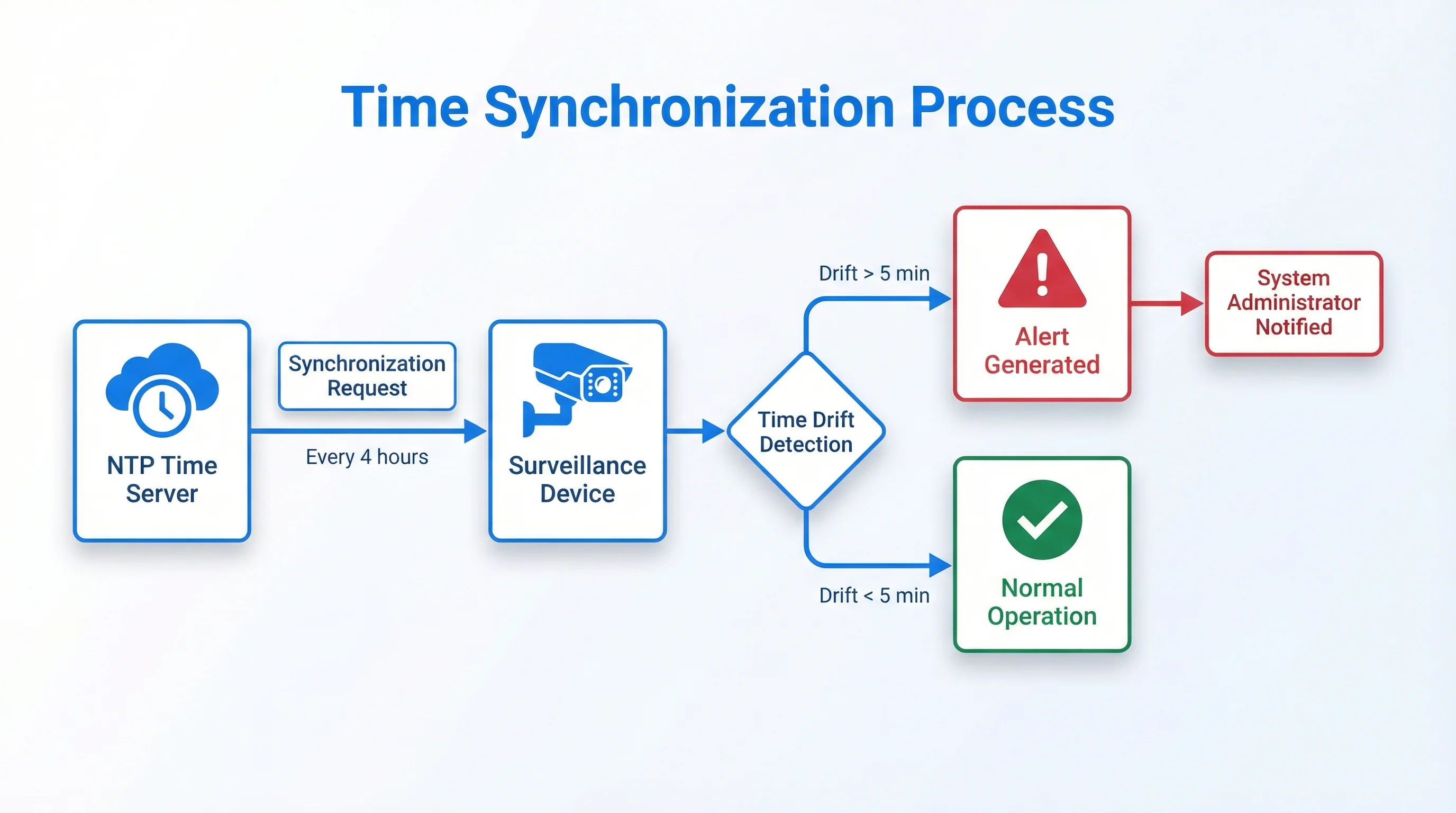
Time Drift Detection and Alerting: Even with synchronization, devices can experience time drift—gradual deviation from the synchronized time. The system must detect when a device's time drifts beyond acceptable limits and alert operators. Time drift detection typically involves comparing each device's time against the synchronized time source at regular intervals (every few minutes to every few hours, depending on the required accuracy).When time drift is detected, the system should generate an alert that includes the device identity, the amount of drift, and the time the drift was detected. This alert becomes part of the evidence chain, documenting that the system detected and responded to time synchronization issues.
Timezone and Daylight Saving Time Handling: Timestamps must account for timezone and daylight saving time changes. A system that captures footage at 14:00 in one timezone and stores it as 14:00 without timezone information creates ambiguity. When the footage is later reviewed, it is unclear whether 14:00 refers to the original timezone or the reviewer's timezone.The solution is to store all timestamps in a standardized format that includes timezone information. UTC (Coordinated Universal Time) is the standard choice. All devices should capture timestamps in UTC, and all storage systems should store timestamps in UTC. When timestamps are displayed to users, they should be converted to the relevant local timezone with clear indication of the timezone.
Daylight saving time changes create particular challenges. When daylight saving time begins or ends, the local time "jumps" by one hour. A system that uses local time without accounting for this jump will have ambiguous timestamps during the transition period. The solution is to use UTC internally and handle timezone conversion at the display layer.
Time Verification and Proof: The system must provide mechanisms to verify that timestamps are accurate. This typically involves:- Logging the time synchronization events (when each device synchronized with the time source) - Storing the time offset (the difference between the device's local time and the synchronized time) at regular intervals - Providing tools to verify that a specific timestamp is within the acceptable accuracy range - Documenting the time source and its accuracy (e.g., "NTP server with ±10ms accuracy")
When footage is exported or presented as evidence, the export should include documentation of the time synchronization status at the time of capture. This documentation becomes part of the evidence chain, proving that the timestamp is reliable.
Operational Requirements for Time Credibility
Regular Time Synchronization Verification: Operators should regularly verify that all devices are properly synchronized. This might involve running a time synchronization audit monthly or quarterly, checking that all devices' times are within acceptable limits of the synchronized time source. Time Synchronization Failure Response: When time synchronization fails (a device loses connection to the time source or experiences excessive drift), operators should respond promptly. The response might include:- Investigating the cause of the failure - Repairing the device or its network connection - Manually correcting the device's time if necessary - Documenting the failure and the corrective action - Reviewing footage captured during the failure period to assess whether the timestamps are reliable
Documentation of Time Source and Accuracy: The organization should document the time source used for synchronization (NTP server, GPS receiver, atomic clock) and its accuracy specifications. This documentation becomes part of the evidence chain, supporting claims about timestamp reliability.Dimension 2: Capture Chain Completeness
The Question: Is all the footage from the relevant time period present, or are there gaps?A complete capture chain means that all video frames from the relevant time period are present and in sequence. Missing frames, dropped packets, or buffer underruns create gaps in the evidence. These gaps are problematic because they raise questions about what happened during the missing period.
Why Capture Chain Completeness Matters
In a critical investigation, missing frames can be interpreted as hiding evidence. An attorney can argue that the missing frames could contain exculpatory or incriminating evidence. A forensic expert can testify that the footage is incomplete. Without proof that the footage is complete, its evidential value is diminished.
Capture chain completeness is also important for establishing the sequence of events. If frames are missing, the sequence becomes unclear. An event that appears to happen instantaneously in the footage might have taken several seconds in reality, with the intermediate frames missing.
Technical Requirements for Capture Chain Completeness
Continuous Frame Numbering: The video stream should include frame numbers that increment continuously. Frame numbers allow detection of missing frames. If frame numbers jump (e.g., from frame 1000 to frame 1005), it indicates that frames 1001-1004 are missing.Frame numbers should be included in the video metadata and should be verifiable (not easily modified). When footage is exported, the frame numbers should be preserved, allowing independent verification that no frames are missing.
Packet Sequence Verification: At the network level, video data is transmitted in packets. Each packet should include a sequence number. The receiving system should verify that all packets are received in sequence. If packets are missing or out of order, the system should detect this and log the event. Buffer Management and Underrun Detection: Video capture and transmission involve buffers (temporary storage areas for data). If the buffer becomes full and cannot accept new data, an underrun occurs—incoming data is lost. The system should detect buffer underruns and log them. When an underrun is detected, the system should alert operators and document the event in the evidence chain. Codec-Level Integrity: Some video codecs include integrity mechanisms. For example, some codecs include checksums or error correction codes that allow detection of corrupted frames. The system should use codecs that include such mechanisms and should verify the integrity of each frame as it is captured. Completeness Verification Tools: The system should provide tools to verify that footage is complete. These tools might:- Check frame numbers for continuity - Verify packet sequence numbers - Check for codec-level integrity violations - Compare the expected number of frames (based on duration and frame rate) with the actual number of frames - Generate a completeness report that documents any gaps or anomalies
Operational Requirements for Capture Chain Completeness
Monitoring for Capture Failures: Operators should monitor the system for capture failures. This includes monitoring for:- Network disconnections or packet loss - Storage system failures - Device failures or reboots - Buffer underruns or overflow conditions - Codec errors or corruption
When failures are detected, operators should investigate and document the failure. If footage was captured during the failure, operators should assess whether the footage is complete and reliable.
Testing and Validation: The organization should regularly test the capture chain to verify that it is complete. This might involve:- Simulating network failures and verifying that the system detects them - Simulating storage failures and verifying that the system responds appropriately - Running completeness verification tools on stored footage - Comparing stored footage with external records (transaction logs, access logs) to verify that the footage covers the expected time period
Dimension 3: Storage Integrity and Tamper Prevention
The Question: Can we prove that the stored footage has not been modified or deleted?Storage integrity means the footage is protected against unauthorized modification, deletion, or corruption. Without storage integrity protection, the footage could be altered without detection. Even if no alteration has occurred, the absence of protection mechanisms makes the footage's authenticity questionable.
Why Storage Integrity Matters
Storage integrity is the mechanism that makes verifiability possible. If stored footage can be modified without detection, then any claim about the footage's authenticity is questionable. An attorney can argue that the footage could have been altered. A forensic expert can testify that there is no proof the footage is authentic.
Storage integrity protection also prevents accidental corruption. Storage systems can experience bit errors, sector failures, or other corruption events. Without integrity protection, these corruptions might go undetected. With integrity protection (checksums or error correction codes), corruptions can be detected and potentially corrected.
Technical Requirements for Storage Integrity
Write Protection: The storage system should implement write protection that prevents unauthorized modification or deletion of stored footage. Write protection mechanisms might include:- Read-only storage (footage is written once and cannot be modified) - Role-based access controls (only specific users can modify footage) - Time-based protection (footage becomes read-only after a specified retention period) - Cryptographic protection (footage is encrypted with a key that is not available to users)
Write protection should be enforced at multiple levels: the storage device level, the file system level, and the application level. This defense-in-depth approach ensures that even if one level of protection is compromised, others remain intact.
Integrity Checksums: The system should calculate cryptographic checksums (such as SHA-256 hashes) of stored footage. These checksums allow detection of any modification to the footage. If even a single bit of the footage is changed, the checksum will change, indicating that the footage has been modified.Checksums should be calculated when footage is stored and should be stored separately from the footage itself (ideally in a protected location that is difficult to access). When footage is retrieved or exported, the checksum should be recalculated and compared with the original. If the checksums match, the footage has not been modified.
Digital Signatures: For the highest level of assurance, the system should use digital signatures. A digital signature is a cryptographic proof that the footage was created by a specific device at a specific time and has not been modified since. Digital signatures use public-key cryptography: the device signs the footage with a private key, and the signature can be verified using the device's public key.Digital signatures provide stronger assurance than checksums because they prove not just that the footage is intact but also that it came from a specific, authentic source. An attacker who modifies the footage cannot create a valid signature without access to the device's private key.
Chain of Hashes: For long-term storage, a chain of hashes can be used. Each piece of footage includes a hash of the previous piece. This creates a chain where each piece is cryptographically linked to the previous piece. If any piece in the chain is modified, the chain breaks, indicating tampering.Chain of hashes is particularly useful for detecting tampering in long-term storage. Even if an attacker modifies a piece of footage, the modification will break the chain, making the tampering obvious.
Redundancy and Backup Integrity: The system should maintain redundancy (multiple copies of the footage) and backups. However, redundancy and backups must themselves be protected against tampering. Backup copies should be stored in separate locations and should be protected with the same integrity mechanisms as the primary storage.Operational Requirements for Storage Integrity
Regular Integrity Verification: Operators should regularly verify the integrity of stored footage. This might involve:- Running integrity verification tools that recalculate checksums and compare them with stored checksums - Verifying digital signatures on a sample of stored footage - Checking for any anomalies in the storage system (unexpected file modifications, access patterns, etc.) - Comparing stored footage with external records to verify that the expected footage is present
Integrity Failure Response: When an integrity verification fails (a checksum mismatch indicates potential tampering), operators should:- Investigate the cause of the failure - Determine whether the failure indicates actual tampering or a system error - Preserve the affected footage for forensic analysis - Document the failure and the investigation results - Review access logs to determine who had access to the footage
Backup Verification: Operators should regularly verify that backup copies are intact and can be restored. This includes:- Restoring backup copies to a test environment - Verifying that the restored footage matches the original - Checking that integrity checksums are preserved in the backup - Testing the backup restoration process to ensure it works when needed
Dimension 4: Access Control and Audit Logging
The Question: Who accessed the footage, when, and what did they do?Access control and audit logging ensure that only authorized persons can access footage and that all access is logged and traceable. Without access control, anyone with system access could modify, delete, or selectively export footage. Without audit logging, unauthorized access could occur without detection.
Why Access Control and Audit Logging Matter
Access control and audit logging are the mechanisms that establish accountability for the footage. They answer the question: "Can we prove that the footage has not been tampered with by an insider?" Without comprehensive access logs, an organization cannot prove that an insider did not modify the footage.
Access control and audit logging also support regulatory compliance. Many regulations require documented evidence that access to sensitive data (including surveillance footage) is controlled and monitored. Organizations without comprehensive access logs may fail regulatory audits.
Technical Requirements for Access Control and Audit Logging
Role-Based Access Control (RBAC): The system should implement role-based access control that defines different roles with different permissions. Typical roles might include:- Viewer: Can view footage but cannot export or modify it - Operator: Can view footage and perform routine operations (playback, searching) but cannot export or delete - Administrator: Can manage the system, including user accounts and system settings - Evidence Officer: Can export footage for evidence purposes, with all exports logged - Auditor: Can view access logs and audit reports but cannot modify footage or access logs
Each role should have the minimum permissions necessary to perform its function. Users should be assigned to roles based on their job responsibilities. Access should be revoked when users change roles or leave the organization.
Multi-Factor Authentication: Access to the surveillance system should require multi-factor authentication (such as username/password plus a hardware token or biometric). This prevents unauthorized access even if a user's password is compromised. Comprehensive Audit Logging: Every access to the surveillance system should be logged. The audit log should record:- Who: The user or system that accessed the footage - When: The date and time of the access (with timezone information) - What: The specific footage accessed (camera, time period, duration) - How: The method of access (web interface, mobile app, API, direct storage access) - Action: What the user did (viewed, exported, searched, etc.) - Result: Whether the action succeeded or failed
Audit logs should be comprehensive and detailed. A log entry that simply says "User A accessed footage on 2024-01-15" is insufficient. The log should specify exactly which footage was accessed, for how long, and what the user did with it.
Audit Log Protection: Audit logs themselves must be protected against tampering. Audit logs should be:- Stored in a protected location, separate from the footage - Write-protected so they cannot be modified - Backed up regularly and protected with integrity checksums - Reviewed regularly for anomalies or suspicious patterns
Dual-Control for Critical Operations: For the most sensitive operations (such as exporting footage for evidence purposes or deleting footage), the system should require dual control. This means that two authorized persons must approve the operation before it can proceed. Both persons' actions should be logged. Session Logging: When a user logs into the system, the system should create a session record that documents:- The user's identity - The login time and logout time - The IP address or location from which the user logged in - Any unusual activity during the session
Session logs help detect unauthorized access attempts and unusual access patterns.
Operational Requirements for Access Control and Audit Logging
Regular Access Reviews: Operators should regularly review user access to ensure that:- Users have only the permissions they need - Users who have left the organization or changed roles no longer have access - No unauthorized access has occurred - Access patterns are normal and expected
Audit Log Review: Operators should regularly review audit logs for:- Unusual access patterns (users accessing footage at unusual times or for unusual durations) - Failed access attempts (which might indicate unauthorized access attempts) - Sensitive operations (exports, deletions) that require investigation - Access by users who should not have access to specific footage
Access Incident Response: When an unusual access pattern or failed access attempt is detected, operators should:- Investigate the incident - Determine whether unauthorized access occurred - Preserve evidence of the incident - Document the incident and the investigation results - Take corrective action if necessary
Dimension 5: Export and Verification
The Question: When footage is extracted for use as evidence, how can we prove it matches the original?Export and verification is the final link in the evidence chain. When footage is extracted from the storage system for use in an investigation, legal proceeding, or audit, the exported file must be proven to match the original stored footage. Without export and verification mechanisms, the exported file can be challenged as potentially modified.
Why Export and Verification Matter
Export and verification are critical because they address the final step in the evidence chain: the transition from stored footage to presented evidence. An attorney will ask: "How do we know this exported file is the same as the original stored footage? Could it have been edited during export?"
Export and verification mechanisms answer this question. They provide proof that the exported file is identical to the original and has not been modified during export.
Technical Requirements for Export and Verification
Metadata Inclusion: Exported files should include comprehensive metadata that documents:- Original capture time and device identity - Storage location and duration - Integrity checksums of the original stored footage - Export time, user, and method - Any processing applied during export (compression, format conversion) - Timezone and daylight saving time information
Metadata should be embedded in the exported file (in the file headers or in a sidecar file) and should be protected against modification.
Export Integrity Verification: The export process should calculate a checksum of the exported file and include this checksum in the export. When the exported file is received by another party, they can recalculate the checksum and verify that the file has not been modified during transmission. Digital Signatures on Exports: For the highest level of assurance, exported files should be digitally signed. The signature proves that the file was exported by the authorized system and has not been modified since export. Standardized Export Formats: Exported files should be in standardized, widely-supported formats (such as MP4 or MOV) rather than proprietary formats. This allows the exported file to be viewed and verified using standard tools, reducing dependence on proprietary software. Verification Tools: The system should provide verification tools that allow independent verification of exported files. These tools should:- Verify the digital signature (if present) - Verify the checksum - Extract and display the metadata - Check for any signs of modification or corruption - Generate a verification report
Verification tools should be available to all parties who need to verify exported footage, not just to the organization that exported it.
Chain of Custody Documentation: The export process should generate a chain of custody document that records:- Who exported the footage and when - What footage was exported (camera, time period, duration) - The export method and format - The checksum and digital signature (if applicable) - Who received the exported file and when - Any subsequent handling of the exported file
The chain of custody document becomes part of the evidence and supports claims about the exported file's authenticity.
Operational Requirements for Export and Verification
Export Procedure Documentation: The organization should document the procedure for exporting footage for evidence purposes. This procedure should specify:- Who is authorized to export footage - What approvals are required before export - What information must be included in the export - How the exported file should be labeled and documented - How the exported file should be transmitted and to whom - What verification steps should be performed
Export Training: Personnel who export footage should be trained on the export procedure and on the importance of maintaining chain of custody. Training should cover:- The legal requirements for evidence handling - The export procedure and tools - The importance of metadata and verification - Chain of custody documentation - Common mistakes and how to avoid them
Export Auditing: All exports should be audited. This means:- Reviewing the export logs to verify that exports were performed correctly - Verifying that the exported files match the original stored footage - Checking that metadata and verification information are present - Investigating any anomalies or unusual exports
Integration: The Complete Evidence Chain
These five dimensions work together to create a complete evidence chain. Time credibility establishes when the footage was captured. Capture chain completeness ensures all relevant footage is present. Storage integrity ensures the footage has not been modified. Access control and audit logging ensure that any modification would be detected. Export and verification ensure that the exported file matches the original.
An organization that implements all five dimensions can confidently present surveillance footage as evidence. The organization can prove: - When the footage was captured (time credibility) - That all relevant footage is present (capture chain completeness) - That the footage has not been modified (storage integrity) - Who accessed the footage and what they did (access control and audit logging) - That the exported file matches the original (export and verification)
This complete evidence chain transforms surveillance from observation to evidence.